Sign in, save, and come back
On the same browser, open SIGN IN + RESUME and unlock your existing Self. On a new browser, do not assume that signing into GitHub or knowing your public handle restores your work.
The picture above shows the current sign-in screen. The diagram below explains the separate things it can remember.
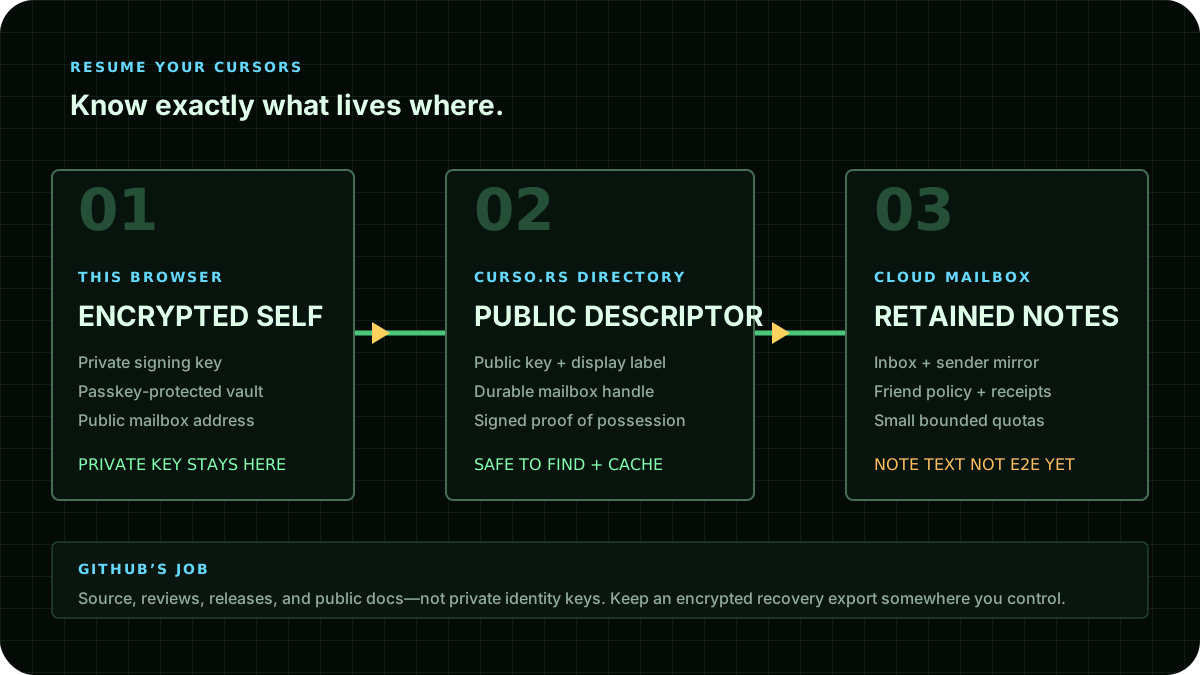
The easy path in this browser
- Open SIGN IN + RESUME. Check Local vault. An encrypted, locked record means your Self is still here.
- Choose UNLOCK WITH PASSKEY and complete your browser's verification. Your signing key is available only for this page session.
- Return to START or CHAT for the local notebook. Notes use this browser's local mailbox store, not the cloud composer.
- Use LOCK THIS SESSION when you are finished. Locking does not delete the encrypted record.
New here? CREATE WITH PASSKEY makes a new encrypted Self and leaves it locked. Then unlock it. Creation refuses to replace an existing Self.
The shell and cockpit share one page-wide vault session. Moving between them does not create another identity or silently lock a different surface's session.
What is actually saved where?
| Thing | Where it lives | What you still need |
|---|---|---|
| Local notes | This browser profile, under this site's local curve | The same retained site data; they are not encrypted or cloud-backed |
| Address book | This browser, scoped to guest or the selected Self | That local profile; a label is not proof of the other person's identity |
| Encrypted Self | This browser's vault | Its original compatible passkey to unlock it |
| Public mailbox descriptor | Optional curso.rs directory, after an acknowledged publish | It reveals a public address; it cannot restore the private identity |
| Experimental cloud notes | Optional service mailbox, after a successful service operation | Working APIs and appropriate authenticated access; the browser has not yet encrypted durable note content end-to-end |
| Encrypted recovery file or gist | Your chosen storage carrier | The original unlocking credential and compatible origin/device support |
| Cursor work | Its own signed records, immutable state, checkpoints, and receipts | Available material plus verified continuation authority; not merely an account login |
Publish a public mailbox — optional
First read the service strip. Paused is an intentional deployment restriction, not something a different password fixes. Disabled cloud buttons are labeled with that reason. Do not bypass the gate.
When the deployment reports compatible configuration, unlock your Self and choose PUBLISH PUBLIC MAILBOX. Only the returned success message confirms that this operation completed. A failed or unreachable lookup stays unknown, not “you have no mailbox.”
Copy Durable mailbox handle to share the public 40-character address. This is not your passkey, encrypted backup, or permission for another person to run your cursors. Publication makes you discoverable; it is not a backup of your identity or work.
Keep an encrypted identity backup
In the recovery card choose EXPORT ENCRYPTED SELF. Save the JSON file somewhere you control. The file contains an encrypted identity, not plaintext private keys, notes, contacts, or all cursor history.
Keep the original compatible passkey. A synced passkey may help across devices only when it can reproduce the required PRF output under the correct relying-party/origin rules. A passkey for another site, another fork, or a newly created credential is not interchangeable. The backup is not independently decryptable.
To test recovery in an empty compatible browser, use Import into an empty browser. The importer validates the encrypted vault format, refuses an oversized file, and refuses to overwrite an existing Self. Then unlock using the original compatible passkey. Confirm the public identity matches your original before trusting the recovery.
Do not delete the original browser data until that test succeeds. There is no password-reset service that can recreate a missing private key.
GitHub is an optional carrier
Continue with GitHub uses the configured GitHub sign-in flow and an encrypted gist. It does not turn your GitHub account into your Self or let GitHub decrypt the backup.
A GitHub “secret” gist is unlisted, not private. Its confidentiality must come from encryption. An optional public hydration README contains public references and is intentionally public. Publishing it is a separate choice.
When something goes wrong
No compatible passkey: stay local; do not hand over a password or private key. A legacy passphrase-protected vault cannot be unlocked by this newcomer surface.
Cloud paused/unavailable: keep your existing local data and use CHECK AGAIN later. A healthy web page does not prove that its write APIs are enabled.
Imported file still locked: that is expected. Importing ciphertext and proving possession of its original unlocking credential are different steps.
Signed in, but work is missing: identity recovery is not cursor-state recovery. Find the relevant checkpoints and signed material rather than creating a new identity and assuming it owns the old work.
Next: Chat with a Friend, Local Identity Vault, and Resurrection Capsules.
On iPhone or without WebRTC
Use Cursors on iPhone and iPad for local notes, verified published HTTPS parts, HTTPS-only mode, and returning after the phone sleeps. This does not enable a paused cloud service, guarantee cold offline boot, or make cloud notes end-to-end encrypted.